> ## Documentation Index
> Fetch the complete documentation index at: https://docs.kingdomly.app/llms.txt
> Use this file to discover all available pages before exploring further.
# Mint Admin
> Manage and facilitate your mint contract after deployment
## Overview
The **Mint Admin** is the control center for managing your mint after contract deployment.\
Once you deploy your mint contract, you will be redirected to the **Admin Tab**. From here, you can:
* View an **overview** of your Mint Page.
* Continue editing connected elements such as **Art Gallery collections** (only if they match the same supply).
* Adjust **Mint Groups** as needed.
* Withdraw your funds and manage payout addresses.
* Set the start date and time for your mint.
* Set the base URI for your collection.
* Airdrop NFTs to your community.
* Enforce royalties on your collection. (for ERC721AC contracts)
***
## Mint admin features
### Mint Tracker
* Displays total minted supply vs total supply.
* Shows mint status (Open or Closed), scheduled mint date, and balance of fees collected.
* Includes a **Start Minting** button to begin the mint process when ready.
**Setting the start date and time for your mint**
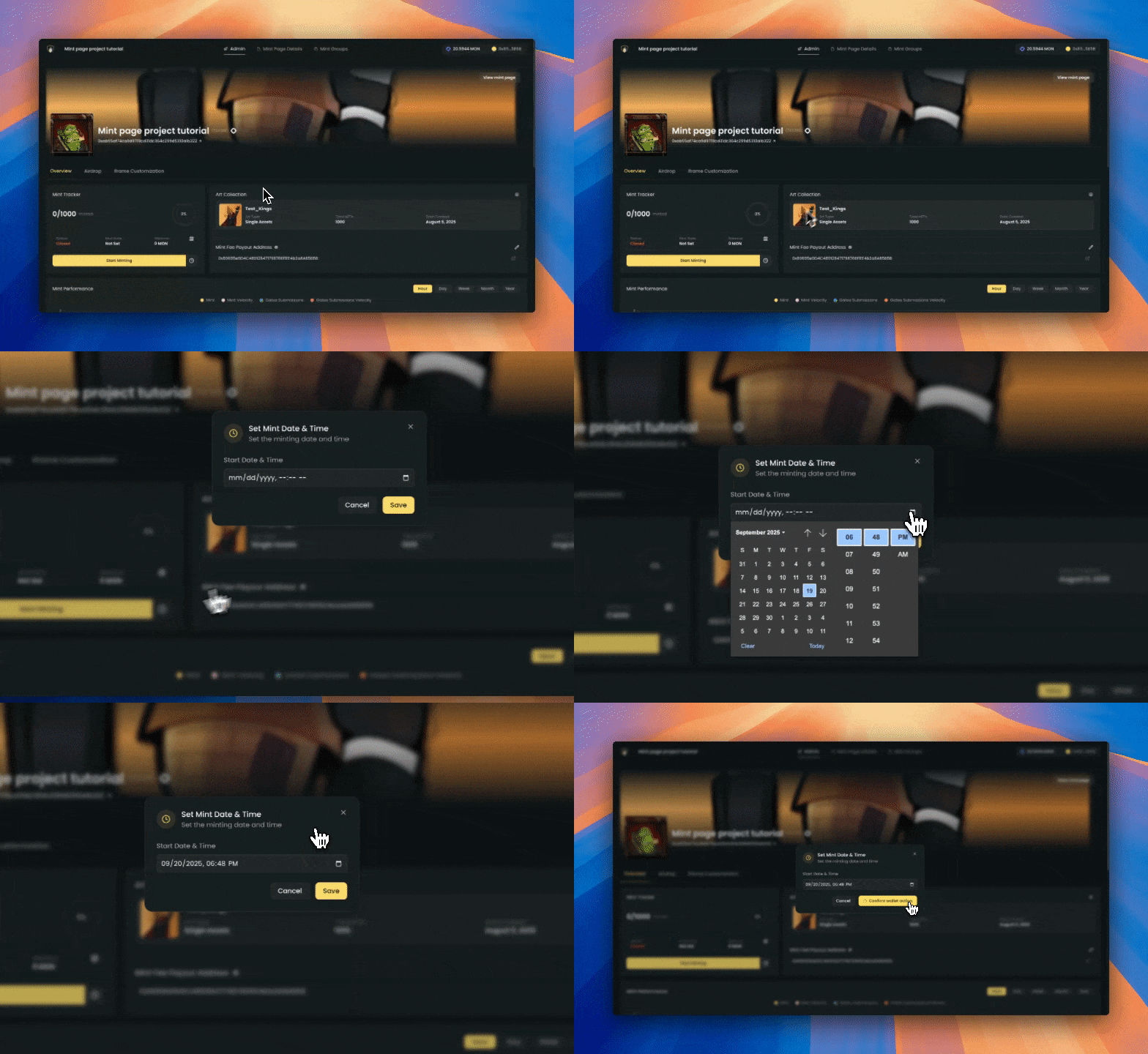 The timestamp for your mint is linked to your local timezone. This means you will need to convert the timestamp to your local timezone.
To check if you have properly set the start date and time for your mint, you can check the **Mint Tracker** tab. It should show **Scheduled**
### Art Collection Panel
* Shows connected art collection details (name, type, total NFTs, date created).
* Displays the **Mint Fee Payout Address** with options to edit or update.
* Creators can update the **Mint Payout Address** and **Royalty Payout Address** at any time.
* If you want to change the base URI for your collection, you can do so here.
The timestamp for your mint is linked to your local timezone. This means you will need to convert the timestamp to your local timezone.
To check if you have properly set the start date and time for your mint, you can check the **Mint Tracker** tab. It should show **Scheduled**
### Art Collection Panel
* Shows connected art collection details (name, type, total NFTs, date created).
* Displays the **Mint Fee Payout Address** with options to edit or update.
* Creators can update the **Mint Payout Address** and **Royalty Payout Address** at any time.
* If you want to change the base URI for your collection, you can do so here.
 **Post-reveal collections:**
This is where you can change the base URI for your collection. This is useful for post-reveal collections, where pre-reveal tokens point to a placeholder and then update to unique metadata after reveal.
**Custom base URI:**
We have enabled a way for creators to set a custom base URI for their collection. This is useful for technical creators who want to use a custom base URI for their collection.
Make sure to enclose your custom base URI in forward slashes `/` with a prepending `ipfs://`
**Example:**
`ipfs://bafybeih5c6r52xxdv46j6nz3w344u4d7j5x2fhzod5vng254b2nd2p7sq4/`
The contract automatically appends the token ID to the base URI. The NFT might be broken if done incorrectly.
### Mint Performance Dashboard
Provides live charts and metrics for:
* **Mints**
* **Mint Velocity** (this is the number of mints per hour)
* **Gates Submissions**
* **Gates Submissions Velocity** (this is the number of gates submissions per hour)
Filters available by **Hour, Day, Week, Month, Year** to analyze mint activity over time.
### Airdrop NFTs
* Send NFTs directly to wallets from the Admin Tab.
* Perfect for rewarding early supporters, community giveaways, or team allocations.
* For airdrops, the fee is **\$0.33 per airdrop / burn**.
Make sure the addresses are EVM wallets. Airdrop wont work if the address is either non-EVM or a smart contract.
### Enforced Royalties Dashboard (ERC721AC)
* Available only for **ERC721AC contracts**.
* Lets you enforce or adjust royalties on your secondary sales.
* Gives creators control over the royalty percentage, royalty payout address, and token transfer validation.
* Creators can set their NFTs to temporarily be non-transferable by choosing the **Locked NFT** option.
Royalty adjustments may vary depending on the marketplace. You will need to change the royalty percentage manually on other marketplaces due to the nature of their implementation.
### Withdraw & Payout Controls
* Withdraw mint proceeds directly from the Admin Tab.
* Update both **Mint Fee Payout Address** and **Royalty Payout Address** securely at any time.
### (NEW) Iframe integration
* Easily embed your mint page in your own website.
* Manage your mint page from kingdomly admin panel and the iframe will update automatically.
* Use the iframe code to embed your mint page in your own website.
***
## Summary
The **Mint Admin** gives creators full control over their collection after contract deployment.
From here, you can monitor performance, manage payout addresses, schedule your mint, airdrop NFTs, and enforce royalties.
Key highlights include:
* **Mint Tracker**: Stay on top of mint progress and scheduling.
* **Art Collection Panel**: Update payout addresses and manage base URIs, including post-reveal changes.
* **Performance Dashboard**: Analyze activity with live charts and metrics.
* **Airdrops**: Reward your community with direct NFT distributions.
* **Royalties Control (ERC721AC)**: Enforce and configure royalties for your collection.
* **Withdrawals**: Securely claim proceeds and update payout settings.
* **Iframe Integration**: Embed your mint page into any website with live updates.
In short, the Mint Admin is your **command center**, a single place where you can launch, manage, and optimize every aspect of your NFT mint on Kingdomly.
**Post-reveal collections:**
This is where you can change the base URI for your collection. This is useful for post-reveal collections, where pre-reveal tokens point to a placeholder and then update to unique metadata after reveal.
**Custom base URI:**
We have enabled a way for creators to set a custom base URI for their collection. This is useful for technical creators who want to use a custom base URI for their collection.
Make sure to enclose your custom base URI in forward slashes `/` with a prepending `ipfs://`
**Example:**
`ipfs://bafybeih5c6r52xxdv46j6nz3w344u4d7j5x2fhzod5vng254b2nd2p7sq4/`
The contract automatically appends the token ID to the base URI. The NFT might be broken if done incorrectly.
### Mint Performance Dashboard
Provides live charts and metrics for:
* **Mints**
* **Mint Velocity** (this is the number of mints per hour)
* **Gates Submissions**
* **Gates Submissions Velocity** (this is the number of gates submissions per hour)
Filters available by **Hour, Day, Week, Month, Year** to analyze mint activity over time.
### Airdrop NFTs
* Send NFTs directly to wallets from the Admin Tab.
* Perfect for rewarding early supporters, community giveaways, or team allocations.
* For airdrops, the fee is **\$0.33 per airdrop / burn**.
Make sure the addresses are EVM wallets. Airdrop wont work if the address is either non-EVM or a smart contract.
### Enforced Royalties Dashboard (ERC721AC)
* Available only for **ERC721AC contracts**.
* Lets you enforce or adjust royalties on your secondary sales.
* Gives creators control over the royalty percentage, royalty payout address, and token transfer validation.
* Creators can set their NFTs to temporarily be non-transferable by choosing the **Locked NFT** option.
Royalty adjustments may vary depending on the marketplace. You will need to change the royalty percentage manually on other marketplaces due to the nature of their implementation.
### Withdraw & Payout Controls
* Withdraw mint proceeds directly from the Admin Tab.
* Update both **Mint Fee Payout Address** and **Royalty Payout Address** securely at any time.
### (NEW) Iframe integration
* Easily embed your mint page in your own website.
* Manage your mint page from kingdomly admin panel and the iframe will update automatically.
* Use the iframe code to embed your mint page in your own website.
***
## Summary
The **Mint Admin** gives creators full control over their collection after contract deployment.
From here, you can monitor performance, manage payout addresses, schedule your mint, airdrop NFTs, and enforce royalties.
Key highlights include:
* **Mint Tracker**: Stay on top of mint progress and scheduling.
* **Art Collection Panel**: Update payout addresses and manage base URIs, including post-reveal changes.
* **Performance Dashboard**: Analyze activity with live charts and metrics.
* **Airdrops**: Reward your community with direct NFT distributions.
* **Royalties Control (ERC721AC)**: Enforce and configure royalties for your collection.
* **Withdrawals**: Securely claim proceeds and update payout settings.
* **Iframe Integration**: Embed your mint page into any website with live updates.
In short, the Mint Admin is your **command center**, a single place where you can launch, manage, and optimize every aspect of your NFT mint on Kingdomly.